Thursday, 29 January 2015

UNIT 2 - Software


UNIT 2 - SOFTWARE

Software is the program that runs on a computer

-          Includes: Application software and system software – operating systems, drivers, film ware, servers

-          System software – controls and makes use of hardware

-          Applications software – programs which world tasks. Microsoft word

-          Software is written by programmers using various programming languages

Alan Turning thought of a device which will do any task when given the instruction to do so

-          Instructions are loaded into the RAM from the hard drive and fetched – decoded and executed by the CPU. These instructions are a program i.e. software

-          CPU understands Binary – machine code long winded and difficult. So programmers use high level

Software

-          The operating system – necessary to run all computing devices

Functions of The operating system

-          Sits between your applications and hardware of your computer

-          Deals with controlling all aspects of the computer

-          Makes it easier to write applications

-          Kernel is the lowest level of OS and controls the hardware

Functions – Manages hardware

-          Manages hardware and software resources of the system

-          In a desktop computer theses resources include: processor, memory, disk space and more

- EG; when you wish to save a document the application passes the document to the OS

 
- OS needs to use different instructions to save to a hard disk compared to solid state drive

 
- OS uses special software called device driver to translate specific instructions

Each different piece of hardware will have a device driver to communicate between the OS and hardware.
 

Device drivers are used to communicate

Peripheral Management

-          Computer has peripherals in order to input output and store instructions data. The signal which controls them is a device driver controlled by the software. Each peripheral has its own driver depending on manufacturer there are some genetic device drivers ion windows 7/8 

-          Application software doesn’t need to know about the devices it passes on requests from the users to the program

-          Interpret signal id generally by a program which tells the Operating System to stop a program using a device and make the CPU do a task for another programme with the device

User setting

-          Applets – a small application that does a single task
Firm ware

-          The initial starts up before device drivers are loaded on. This is stored permanently on ROM chips e.g. BIOS- basic input output system which does initial start-up of a computer.

-          Also runs on a simple devices such as TV remote or camera
Server

-          The word server applies to the hardware (the computer) and software

-          Server software resounds to the requests of other programs (clients). It is used on the internet and on smaller networks like we have in school e.g. when we ask to print – the server software processes the request and delivers the data to the client

-          Any computer can be a software, just install software data

Functions

Multitasking

-          The operating system controls multitasking making it look like the computer is running more than one program at once

-          It does this by switching between programs very quickly

-          The #CPU is so fast there are times when the RAM can’t keep up (video buffing) so the CPU is instructed by the OS to do something in this time

Memory management

-          The OS controls the memory management allocating RAM space to programs

-          Determines how much memory each app had and what to do if the memory becomes full

-          Manages virtual RAM

-          Tracks where data and programs are at any one time to make efficient use of the memory and ensure nothing is lost

Security

-          OS must protect processes from each other and users=s from each other because PCs are used by multiple users at home or on a network and on the internet.

-          Manages

-          Tracks who owns each file and what privileges the user has on each file/folder e.g. admin rights

-          Passwords to login allow you to protect your phone from other users but also allow you to use networked computers on your own profile.

 User Interface – how you interact different types

-          OS provides a user interface

-          This is what the other user sees when they wish to use the computer system

-          There are different types of user interfaces, each with their own advantages and disadvantages

User interface – command line interface

-          This is used to be the only way to operate a computer

-          Commands are typed in at a prompt to run programs or perform actions

-          Does not need a powerful computer

-          Fast to get things done

-          Not suitable for beginners as you need to know the commands before you can operate the computer used by technicians

Menu

-          Often seen on devices where the input device is limited TV remote

-          As all the options are there to be seen Simple and easy for novices

-          Simple to navigate and easy to determine what to do

Graphical user interface GUI

-          Popular with ease of use

-          Is the way we most often control the computer

-          Programs run in windows, icons represent files and apps

-          Actions may have metaphors dragging a file on to the trash can mean delete the file for example,

-          Intuitive and easy for beginner

Voice recognition

-          Still evolving but is becoming more widely used e.g. call centres ask the user to say numbers and yes/no. apple iPhone has voice recognition as part of OS – Siri

Windows

-          Windows Operating System currently 8.1 keeps the GUI and all applications looking similar so that a user can easily use them. They all use code that is part of windows itself

-          It has a huge range of capabilities, far greater than OS itself

MAC OS

-          On PC this is currently Yosemite. This is based on a UNIX system and has led to the iOS for mobile devices. It is a proprietary system which has enabled new ways of thinking about how a user interacts with the OS

-          More reliable artists media

LINUX

-          Open source range of OS’ based on the UNIX Kernal. UNIX works on command line but the new versions of LINUX run a GUI. It is a small OS and is therefore fast and uses less memory. It is very versatile and is used on servers and mobile devices – ANDROID

Thursday, 15 January 2015

How RAM affects performance


1 (a) ‘RAM’ and ‘ROM’ are acronyms. State what the letters RAM and ROM stand for.
  • RAM - Random Access Memory
  • ROM - Read Only Memory

(b) State the differences between RAM and ROM.
  • RAM a form of volatile memory, it loses all data when power is turned off, ROM is not volatile.
  • ROM is read only, it cannot be changed, data can be written to the RAM by the computer.

(c) Explain why ROM is required by the computer.
  • ROM is needed by the computer so instructions can be remembered by the computer (e.g. configuration settings). BIOS - basic input output system - is stored on ROM so the computer has boot up instructions.  
2. Explain the function of RAM in a computer system.
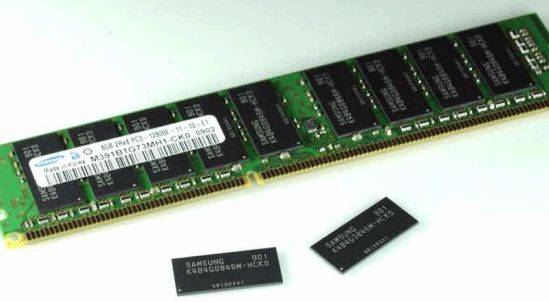
  • RAM is a physical type of volatile memory. It sends instructions to and from the CPU inorder to load documents and programs. when programes are open they are, loaded onto the RAM. RAM allows you to open a number of documents at any one time - however this does slow down your system. To over come this, a bigger RAM should be installed, most computers come with 1-4GB of RAM installed.
3. Explain what happens when there is not enough RAM to store all of the required data
  • When the RAM is full data is swapped out from the CPU on to a hard disk, this is known as Virtual memory. The least used page is most likley to be swapped out, but if it is referenced it will be swapped back for another file/page.
4. Explain how inserting more RAM in a computer affects its performance.
  • With more RAM in a computer more instructions can be prosessed on the RAM meaning that less swapping, in and out, of data to the hard drive is needed.  Constant swapping in and out of data slows down the speed at which programs run. so, increaseing RAM increases the speed of the operating system aswell as increaseing the amount of programs that can be ran at once.

Monday, 15 December 2014

How RAM affects performance

How RAM affects performance

‘RAM’ and ‘ROM’ are acronyms. State what the letters RAM and ROM stand for.

  • RAM - Random Access Memory
  • ROM - Read Only Memory
State the differences between RAM and ROM.
ROM can only be read and not modified, whereas data can be written to the RAM by the computer.
When power is off all data is lost in the RAM, it is volitile, ROM isn't.

Explain why ROM is required by the computer.
ROM is a special type of memory needed by the computer to boot up - known as BIOS (basic input output system) it allows the che computer to be powered off and still store data. This type of memory is needed becuase the computer must be able to obtain instructions the moment it is swithed on. It must know some basics about the machine hardware: configuration settings.

Explain the function of RAM in a computer system.
The function of RAM is to store current running operating system, application programs, and data so they can be quickly reached by the computer's processor. When a program is loaded from the hard disk drive, the program instructions are copied into RAM.

Explain what happens when there is not enough RAM to store all of the required data.
When the RAM is full, the least used/oldest page  (data) will be swapped out, by the operating system, to a file on the hard drive disk - Virtual Memory -. If the page swapped out is needed it is referenced and swapped back for another page.

Explain how inserting more RAM in a computer affects its performance.
Inserting more RAM in a computer affects the overall perforamnce of a computer. The speed of operating the copmuter will increase meaning a better quality of use; faster programes. The spped increases as more RAM allows programe instructions to be loaded quicker without swapping out data onto the hard disk drive becuase of a bigger memory. Also, increasing the RAM can improve multitasking of the computer more programes could be stored in the RAM at once.
 Briefly, more RAM provides;
  • A better storage for data, more program instructions
  • Programes will run faster, less use of virtual memory
  • Allows computer to run multiply of programes - mulittask

Friday, 12 December 2014

Memory - RAM

The term RAM is an acronym.
State what the initials RAM stand for:
Random Access Memory

Explain why this type of memory is 'random access' and how this affects the speed at wich data can be retrieved from it.
RAM is a type of random access memory as you can change any party of the ram in any (random) order and you dont need to start at the first memory place, therefore is quciker so data can doesnt need to travel as far and so recievced at a quicker speed.

What is the main function of RAM in a computer?
The main function of RAM, in a computer, is to store data in the memory. RAM allows you to store read, rewrite, and change data without the need of the first memory location.

In what form is data saved in RAM?
Data in the RAM is saved as Binary.

How much data can be saved in each memory location?
1 byte or 8 bits or data can be saved in each memory location

The main RAM in a computer is made up of dynamic RAM or DRAM.
 - Why is it referred to as dynamic?
It is refered to as dynamic because it is memory that has to be constantly refreshed or it will lose its contents (-data it is storing)   

List the differences between dynamic RAM and static RAM
  • Static RAM does not need to be refreshed, Dynamic RAM does
  • Therefore; Static RAM is quicker as it has no need to refresh and so supplys data to the CPU more rapidly
  • Therefore; because of its benefits, Static RAM is more expensive


Friday, 14 November 2014

Storage Devices

STORAGE DEVICE - any device used to store data

 
Data is stored as a named file on anytime time of staorage device
Computing devices avaliable in todays market:
 
Mobile Phone Storage 
Flash memory micro chip 

Tablet Computer storage 
Expand the performance of your tablet storage with a micro card to enjoy faster data retrieval and seamless media playback (high-speed microSDHC cards)
 
Smartphone Storage
Expand the capacity of a smartphone with a micro card to bring more favorite apps and mobile media wherever you go. (microSDHC™)
 
MP3 Player Storage
Expand music library and carry thousands of more songs on MP3 players with a microSD card slot using the expansive storage space of a micro card(microSDHC card)

Device
 
Capacity
 
Speed of access
 
Portable?
 
Durable?
 
USB Memory Stick
 up to 512 GB
 Fast
 Yes
 Yes
HDD - Hard Disk Drive
 up to 3TB
 Slow(er)
 Yes/No
 Yes
CD
700MB 
 Fast
 Yes
 No
DVD
 8.5GB
 Slow
 Yes
 No
Memory Card
 512MB
 
 Yes
 Yes
SSD - Solid State Drive
 
 Fast
Yes 
 Yes
 
 
 The Cloud Storage Vs Local Storage
The Cloud Storage: anywhere, any time, as long as you have Internet
It has become fixed in how we store, access, and share files, photos, videos, and more. What's not to like? Cloud storage, you can access your file anywhere from any device. They practically act as remote backups, for those cases when you lose, or delete, your local copy.
However, you do require an Internet connection for advance activities. You can edit, view, or do anything else with local copies stored on your device, but you need an Internet connection to upload, sync, and download any file. It's not always a problem but not all locations are created with great internet coverage. Should you have an Internet connection, you still have to be careful of bandwidth usage, downloading large media files all at once may not be appropreate. Although you could stream them but that depends on avaliability of Internet connection.
Another drawback is the question of security and privacy benefits that these cloud services offer. A big issue is the ability of third parties gaining access to your data or use your Internet traffic, with or without the knowledge of service providers. Anything you put out on the Internet; cloud storage, social networking, anything, is always open to theft.
 
Local Storage: fast and secure and fragile
Having the files and work you need right at your fingertips, almost literally, is a huge convenience. An advantage with local Storage compared to Clound storage is you dont have to worry about download or upload times, you are instanly able to watch videos without lag or buffering, also with the ability to listen to your tunes endlessly. To add, there is no need to worry about unwanted eyes and hands gainning access to your data. As long you keep contenet or source off the Internet, you have very little to worry about of the files. The security and privacy of your data is as strong as you allow it.
However you are limited to the amount of data you can store at a single time. The highest capacity of internal storage commonly found on smartphones are capped at 64 GB, the most common high capacity microSD card is 128 GB, but not all smartphones can even support that yet. You can expand your available storage with a useful combination of an external hard drive and a USB on-the-go (OTG) cable but is inconvenient. You end up, trying to decide which files you want to always be with you and files you would swap around with your computer or hard drive. Plus its not an exactly fast or easy way for sharing photos and files with others.
 

Apropriate storage devices 
·         Store a high definition movie -  DVD, BLU-RAY
·         Distribute some software that you’ve written - CD (inc. CD-R, CD-RW), DVD
·         Transfer GCSE Media coursework between home and school - USB Memory stick
·         Storage area on a college network - HDD
 
Factors that should be considered when selecting a suitable storage medium to use in a given situation:
  • Capacity
  • Speed
  • Durability 
  • Portability 
  • Reliability

An example device that makes use of solid state memory storage would be a Memory Stick or USB Memory Card.
 
One benefit of using a magnetic storage device (a HDD) compared to a solid state device (SSD) for storing files on a network is the capacity, HDD has a much higher capacity than a SDD.


Fetch Decode Execute Cycle

Fetch Decode Execute


What does a computer do?

 A computer runs a computer program

What is a Program?

 A program is the sequence of instructions stored in 'memory' required to solve a specified problem.
 
The computer will typically perform the execution cycle when taking on any instruction.
 
There will be different parts :instruction memory, control unit, data memory and data processing / local storage.
 
Three main stages of the cycle include: FETCH -  DECODE -  EXECUTE

 
First, the CU fetches a single instruction and data from the main memory
 
             The instruction is decoded
 
The ALU executes the instruction
 
The ALU sends the result of the processing back to the control unit – this is stored in the memory unit.